YouTube 縮圖生成器
寫一句話,生成 16:9 影片縮圖。勾幾個模型就同時出幾張,挑最抓眼的那張。
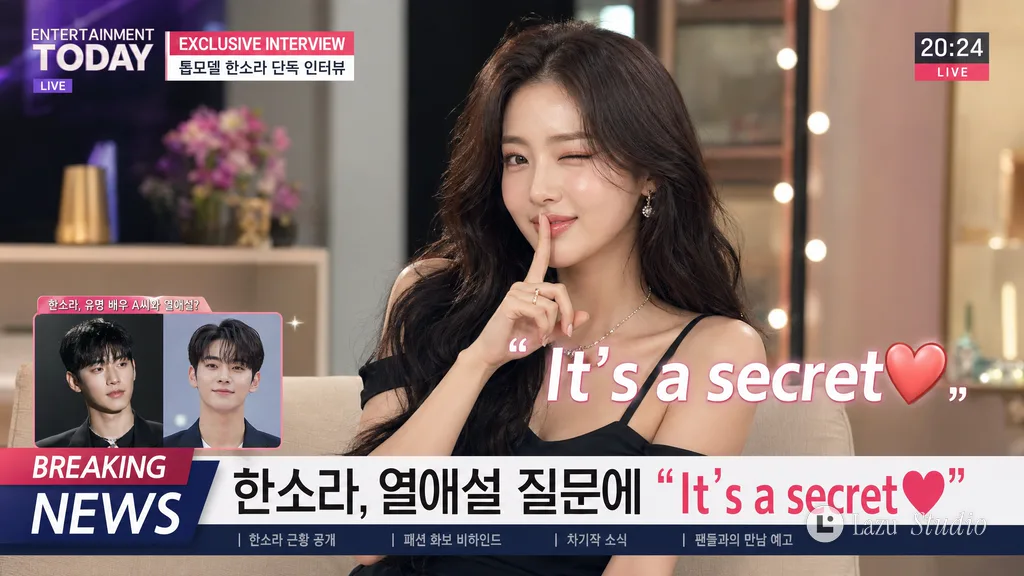
秘密戀情明星電視專訪
{argument name="aspect ratio" default="16:9 landscape"}. {argument name="model" default="A model girl"} is being asked by an entertainment reporter about {argument name="interview topic" default="a romantic relationship with another male celebrity"}. During a TV interview, a caption saying "{argument name="caption" default="It's a secret❤"}" is added to the screen. The screen is a talk show layout with a picture-in-picture window in the bottom left and a time display in the top right. Configure the screen with captions like 'Breaking News' or 'Exclusive Interview'. The model girl says, 'It's a secret❤' with an appropriate pose, putting a forefinger to her mouth and winking with one eye.
YouTube 縮圖提示詞怎麼寫
五條寫法,照著改一句就能用。
-
1
一張圖只講一件事
縮圖在手機上只有拇指大,一個主體、一個動作就夠了。
例:一個人站在玻璃小屋前
-
2
寫出表情或動作
誇張一點的表情最容易讓人停下來點開。
例:驚訝地看向鏡頭
-
3
大字不超過五個詞
放進引號,寫明粗體、白字加描邊,小屏上也讀得清。
例:粗體大字“-30°C 住一晚”
-
4
主體和文字分兩邊
寫明誰在左、字在右,避免臉被字擋住。
例:人物在左,右側三分之一放字
-
5
要高對比
亮主體配暗背景,或反過來,資訊流裡一眼就能看見。
例:藍紫色黃昏天空,人物打暖光
更多縮圖示例
檢視全部縮圖